FILL
A fast conduit-fill check for electricians and the apprentices learning beside them.
Ingredients
- Platform
- App Store
- Year
- 2026
- Made for
- Electricians and apprentices checking conduit fill on the job
- Price
- Free for five calculations. FILL Pro is $7.99 once
- Requires
- iPhone with iOS 15.1 or later
- Role
- Product owner and builder
- Scope
- Worked with a working electrician on scope, UI, pricing, release, and iteration
- Built with
- Expo, React Native, RevenueCat, and NEC reference tables
- Outcome
- Shipped to the App Store after field testing with a working electrician
In short
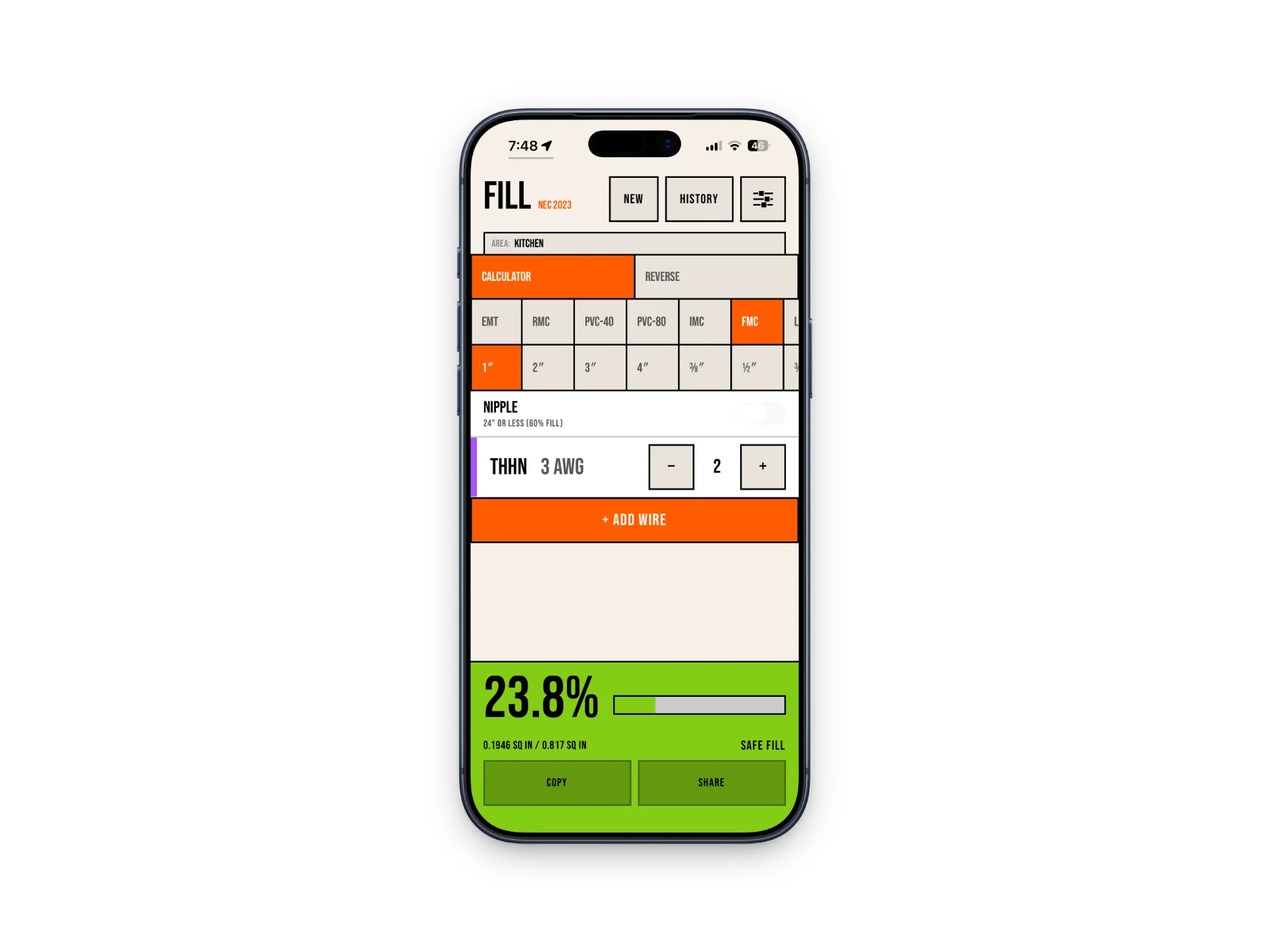
FILL is a conduit fill calculator for iPhone, built with a working electrician. Pick the conduit type and trade size, add conductors, and see the fill percentage and whether it passes, using NEC 2023 or NEC 2026 tables. It works without a signal. Five calculations are free, and a one-time $7.99 unlock removes the limit.
The problem
A journeyman electrician I know is often paired with an apprentice. When they need to check conduit fill, the usual reference is a code book or a set of printed tables. That can mean spreading papers across a work surface that does not exist or holding a page against a wall while trying to do the math.
He wanted a quick field reference: enter the conduit and wires, check the result, and get back to the job. The apprentice angle mattered, but this was not meant to be a course or a full electrician's handbook.
About
I started by asking when the calculation comes up, what has to be visible, and what would make the tool useful on a jobsite. His answer was consistent: keep it easy to read, easy to use, and small enough that no one needs instructions.
I turned those conversations into a three-screen app, sent him screenshots, revised the interface, and then sent a test build. He used it at work for a day or two, indoors and outside, and I changed the parts that slowed him down. FILL was built with Expo and React Native, which also let him test it on Android even though the public release is iOS-only.
The shipped app handles the calculation and saved history without a network connection. Users get five calculations free, then can unlock the full app once for $7.99. There is no subscription.
Method
The product brief
One job, done quickly
The first idea was a broader, multi-purpose electrician app. I pushed back on that scope. I did not have the trade knowledge to build a responsible answer for every electrical task, and an apprentice did not need a crowded app full of tools they might not understand yet.
We kept the calculator at the center. A user picks the conduit type and size, adds conductors, and sees the fill percentage immediately. The app also supports reverse calculations and warns when a configuration exceeds the allowable fill.
The decisions in the product
How it works
Name the area
Add a label such as kitchen, bathroom, or service entrance so the result still makes sense later.
Enter the conduit and wires
Choose the conduit type and trade size, then add conductors by type, gauge, and quantity.
Check or save the result
See the fill percentage and safety state immediately, then copy, share, or retrieve the calculation from history.
Key decisions
Keep the scope narrow
The original request was closer to a general electrician app. I narrowed it to conduit fill because that was the repeated field problem we understood well enough to solve. The final app has about three screens and does not need a tutorial.
Add history and job-area labels
The journeyman pointed out that the same specifications often come up again on a job. History makes those results reusable, while labels such as kitchen, bathroom, or garage preserve the context that a raw percentage would lose.
Make the result readable outside
I used a neo-brutalist interface with heavy outlines, square controls, high contrast, and prominent labels. The style was a practical choice for quick scanning indoors or outside, not decoration added after the calculator was finished.
Test the math with common and unusual inputs
The journeyman supplied the NEC tables. After the calculations were implemented, I had my AI agent produce common and uncommon configurations without showing me the expected results. I entered each one into FILL, returned the output, and checked it against the reference tables. The app still tells users to verify results against the published NEC tables.
Change the price when behavior changed
FILL launched at $4.99. I moved it to $9.99 because it is a professional tool with a one-time purchase, but sales slowed. I reduced the price to $7.99 instead of defending the original assumption. Five free calculations let someone test the workflow before paying.
Service Notes
After launch
About a month after launch, version 1.1 added the NEC 2026 edition and kept NEC 2023 available. Users can choose which edition label appears in the app and in exported results.
Distribution has stayed small and mostly organic through App Store search. I have not run paid ads or a social campaign. That fits the current size of the market, but it also means the usage numbers reflect limited distribution rather than a full growth test.
What went wrong
My calculation testing covered common and unusual inputs, but I did not ask the journeyman to complete a documented, independent acceptance test. If I were restarting the project, I would make that sign-off part of the release checklist for a trade-specific calculator.
App Store ratings so far have no written reviews. The current settings screen lists a support email, but it is not tappable and asks too much effort from someone who has a problem. The next update will add a feedback button that opens a pre-addressed email with useful context already filled in.
Results
- Field-tested
- The journeyman who helped shape FILL used it at work, indoors and outside, before release.
- $4.99 → $9.99 → $7.99
- The current price reflects what happened to purchases when I tested a higher one-time price.
- 2 NEC editions
- NEC 2023 and NEC 2026 remain available in version 1.1.
- $7.99 once
- No subscription. Five calculations are free; the rest is a one-time unlock.
On the job
With more resources
The next product update is small on purpose: make feedback easy to send and learn why a user might leave disappointed. I would also create a repeatable acceptance-test sheet for each NEC edition and have a qualified electrician sign off on it before release.
I would not add more electrician tools until requests show a repeated problem that belongs beside conduit fill. The narrow scope is why FILL can be opened and used without setup or an internet connection.
Questions
- How do I calculate conduit fill on my phone?
- Open FILL, choose the conduit type and trade size, then add each conductor by type, gauge, and quantity. The fill percentage and a pass or over-fill warning appear right away.
- Which NEC edition does FILL use?
- Both. Version 1.1 added NEC 2026 and kept NEC 2023 for jobs that still reference it.
- Does FILL work without a signal?
- Yes. Calculations and saved history work without a network connection.
- How much does FILL cost?
- Five calculations are free. After that, a one-time $7.99 unlock opens the full app. There is no subscription.
Get it
FILL includes five free calculations. The full iOS app is a one-time $7.99 purchase with no subscription.